
CCaaS vs UCaaS: Key Differences and How to Choose

UCaaS connects your client’s employees to each other, while CCaaS connects your client’s employees to their customers. Both run in the cloud, but the use cases, feature sets, and buyer conversations are different.
- UCaaS unifies voice, video, messaging, and collaboration into one platform for internal communication and hybrid-team productivity.
- CCaaS is purpose-built for customer-facing teams, with omnichannel routing, queue management, agent dashboards, and reporting baked in.
- Resellers who can clearly articulate the difference close more deals because buyers are tired of generic “cloud communications” pitches that don’t match their actual workflow.
- The most profitable plays often involve selling both on a single platform with single billing.
Stop treating CCaaS vs UCaaS as an either/or pitch. Treat it as a sequencing question, and lead with the use case your buyer feels most acutely today.
Every business runs on two distinct conversations: the one happening inside the company and the one happening with the outside world. Both are essential, but they need different tooling, and your clients usually feel the pain of one long before the other. As a reseller offering modern cloud communications, the faster you can identify which conversation your buyer is struggling with, the faster you close.
According to Grand View Research, the global UCaaS market is projected to grow from $106.45 billion in 2025 to $404.25 billion by 2033, while the CCaaS market is expected to climb from $5.82 billion in 2024 to $17.12 billion by 2030. That’s a lot of buyer demand spread across two related but distinct categories. The resellers winning right now are the ones who can quickly help clients understand the CCaaS vs UCaaS question, then point them toward the right combination of solutions.
This guide breaks down both platforms, where they overlap, where they diverge, and how to position them to the small and mid-sized businesses you’re selling into.
What Is the Core Difference Between CCaaS vs UCaaS?
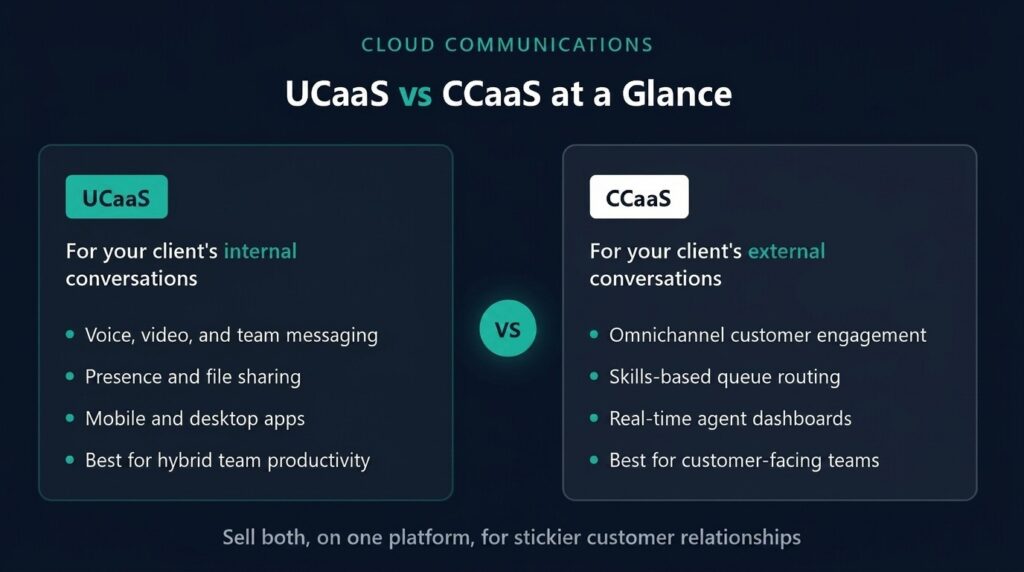
The clearest way to frame the CCaaS vs UCaaS conversation is by audience. UCaaS is for internal users. CCaaS is for external interactions.
Unified Communications as a Service (UCaaS) is a cloud-delivered platform that brings together voice calling, video conferencing, team messaging, presence, file sharing, and mobile communications into a single experience. It’s what your client’s employees use to talk to each other, run meetings, collaborate on projects, and stay connected across remote and hybrid setups.
Contact Center as a Service (CCaaS) is also cloud-delivered, but it’s purpose-built for the teams handling external conversations, such as customer support agents, sales reps, and customer success managers. It layers in capabilities like skills-based routing, queue management, agent dashboards, call recording, post-call surveys, and omnichannel touchpoints across voice, SMS, chat, email, and social channels.
Both platforms share some plumbing. They both use VoIP, run on subscription pricing, integrate with CRMs, and scale up or down as needed. But the user personas, workflows, and feature priorities are different enough that buyers benefit from understanding which one solves their actual problem.
Why This Distinction Matters for Resellers
Your buyers are looking for tailored solutions, not bloated bundles. When you can quickly diagnose whether a client needs UCaaS, CCaaS, or both, you instantly position yourself as a strategic partner rather than just a salesperson with a price sheet. That diagnostic skill separates the resellers winning multi-year contracts from the ones constantly chasing the next deal.
This nuance becomes even more important as platforms converge. Many of the in-demand UCaaS features buyers ask about today straddle both worlds, and your clients want guidance, not a product catalog.
What Is UCaaS, and Who Needs It?
UCaaS replaces the old premises-based PBX system and the patchwork of disconnected apps like Zoom for video, Slack for chat, and a separate desk phone for calls. Instead, everything lives in one cloud platform that employees can access from their laptop, mobile device, or desk phone.
Consolidation matters because hybrid work isn’t going away. With remote and hybrid models now standard for most knowledge workers, businesses need communications that travel with the employee. The growth in UCaaS adoption is driven by the growing remote work culture and the shift away from rigid on-premise systems.
Core UCaaS Features Your Clients Will Expect
A solid UCaaS platform delivers a familiar set of capabilities. When you’re talking with buyers, these are the building blocks they’ll be comparing across providers:
- Cloud-based voice calling with auto attendants, call queues, call recording, and voicemail transcription
- Video conferencing and screen sharing for internal meetings and team collaboration
- Team messaging and SMS for quick conversations that don’t need a call
- Presence and contact management so employees can see who’s available
- Mobile and desktop apps that make a user’s business extension portable across any device
Beyond the basics, the strongest UCaaS platforms layer in geo-redundant networks, quality of service monitoring, and integrations with the productivity tools clients already use, like Microsoft Teams, Outlook, and major CRMs.
Who’s the Ideal UCaaS Buyer?
UCaaS is the right fit for a wide swath of small and mid-sized businesses, especially those with hybrid or distributed teams. Think professional services firms, retail organizations, healthcare offices, real estate agencies, and growing companies that need to coordinate across multiple locations. If your client’s pain point is “our team can’t communicate efficiently,” or “we’re paying for too many disconnected apps,” or “our PBX is holding us back,” UCaaS is the conversation to lead with.

What Is CCaaS, and What Problems Does It Solve?
While UCaaS modernizes internal communication, CCaaS modernizes how a business interacts with its customers. It’s a purpose-built cloud platform for contact centers, customer support teams, and any group that handles a high volume of customer-facing conversations.
A CCaaS platform centralizes every customer touchpoint (voice, SMS, web chat, email, and social) into a single interface. Agents see the full conversation history when a customer reaches out. The platform routes inquiries based on skills and availability and pulls data into dashboards so supervisors can monitor performance in real time.
Top CCaaS Benefits Buyers Care About
When you’re positioning CCaaS to a client, the conversation usually centers on a handful of high-value outcomes. These CCaaS benefits are what move deals from interest to signature:
- Omnichannel customer engagement that meets customers on the channels they prefer, instead of forcing them to call
- Skills-based and queue routing that connects callers to the right agent faster and reduces hold times
- Real-time dashboards and reporting so supervisors can spot bottlenecks, monitor agent performance, and adjust staffing on the fly
- Call recording, coaching, and quality assurance tools that improve agent training and consistency
- CRM integrations that give agents instant context on who’s calling and why
Those CCaaS benefits directly impact customer satisfaction, agent retention, and operational cost, which is why buyers are willing to invest in dedicated contact center technology even when they already have UCaaS in place.
Who Needs CCaaS?
CCaaS isn’t only for traditional call centers anymore. Front-office teams at medical practices, law firms, veterinary clinics, insurance brokers, and small e-commerce operations are using contact center platforms to manage customer inquiries more efficiently. If your client has agents fielding any meaningful volume of inbound calls, chats, or emails, and they care about tracking handle time, abandonment rates, or first-call resolution, CCaaS belongs in the conversation.
How Do UCaaS vs Contact Center Solutions Compare Feature by Feature?
The UCaaS vs contact center comparison gets clearer when you line up the capabilities side by side. Here’s a quick breakdown of where each platform shines and where they overlap.
- Primary audience. UCaaS serves internal employees collaborating across departments. CCaaS serves customer-facing agents handling external interactions.
- Channel breadth. UCaaS focuses on voice, video, and team messaging. CCaaS extends into omnichannel territory with web chat, email, SMS, and social.
- Routing capabilities. UCaaS uses auto attendants and ring groups. CCaaS adds skills-based routing, callback in queue, and custom routing logic.
- Reporting depth. UCaaS offers call analytics and usage reports. CCaaS layers real-time agent dashboards, queue dashboards, customizable reports, and CSAT tracking.
- Quality assurance. UCaaS includes basic call recording. CCaaS adds silent monitoring, coaching tools, and post-call surveys.
- Agent experience. UCaaS users work from a softphone or desk phone. CCaaS agents work from a web-based interface with screen pops, scripting support, and contact history.
- Integrations focus. UCaaS integrates with productivity suites like Microsoft 365. CCaaS goes deeper into CRM, helpdesk, and customer journey tools.
- Pricing model. UCaaS is typically priced per user, per month. CCaaS pricing is usually per agent seat with feature tiers.
Understanding UCaaS vs contact centers matters most when you’re sizing the deal. A 30-employee business with two customer service reps might only need UCaaS plus a couple of contact center seats. A 200-employee operation with a 40-agent inbound team needs robust CCaaS capabilities and a UCaaS layer for the rest of the company. Knowing how to scope both makes you valuable to your buyer.
When Should Resellers Position One Solution Over the Other?
Pitching CCaaS vs UCaaS depends on which conversation is causing your client the most friction right now.
Lead with UCaaS when your client is dealing with employees who can’t reach each other, fragmented apps, an aging PBX, or remote workers struggling to stay connected. These are bread-and-butter UCaaS conversations, and they typically open the door to the broader cloud communications relationship.
Lead with CCaaS when your client’s bottleneck is the customer experience. Long hold times, missed calls, no visibility into agent performance, or customers complaining that they can’t reach the right person; these are CCaaS conversations. The CCaaS benefits, including better routing, omnichannel access, and reporting, tend to map directly to revenue and retention metrics, which makes them easier to justify financially.
The smartest play is often to sell both. Buyers consolidating onto a single platform get fewer vendors to manage, simpler billing, and tighter data flow between internal teams and customer-facing ones. As resellers who offer integrated UCaaS and CCaaS solutions are finding, the combination creates stickier customer relationships and bigger average deal sizes.
Why the Integrated Approach Wins More Reseller Deals
The line between UCaaS and CCaaS is blurring fast. Most modern UCaaS platforms now include a contact center option that can be activated as a bolt-on, which means you can sell a unified solution from day one, then expand the customer’s footprint as their needs grow. That flexibility is a huge competitive advantage when you’re up against providers who only offer one piece of the puzzle.
When you’re evaluating which white-label platform to build your reseller business on, look for one that handles both UCaaS and CCaaS natively, runs on a geo-redundant network for reliability, supports single billing across products, and gives you the marketing and sales resources to effectively position both offerings. Anything less, and you’ll end up patching together a tech stack that’s hard to sell and harder to support.
Frequently Asked Questions
Can a Business Use Both CCaaS and UCaaS Together?
Yes, and increasingly, they should. Many businesses run UCaaS for internal collaboration and add CCaaS for their customer-facing teams, ideally on the same underlying platform so data and workflows stay connected. Integrated solutions tend to deliver better ROI than running two separate vendors.
Is CCaaS Just an Upgraded Version of UCaaS?
No. CCaaS is a distinct platform with capabilities purpose-built for customer service operations, like skills-based routing, agent dashboards, and CSAT tracking. UCaaS is built for internal communication and lacks the depth of contact center functionality, even though both run in the cloud.
What Are the Main CCaaS Benefits Compared to a Traditional Call Center?
The big CCaaS benefits include faster setup with no on-premise hardware, easier scaling up or down as call volume changes, omnichannel customer engagement across voice and digital channels, real-time visibility into agent and queue performance, and lower total cost of ownership compared to legacy call center systems.
How Should Resellers Choose Which Solution to Lead With?
Lead with the solution that solves your client’s most painful problem first. If they’re frustrated with internal communications, start with UCaaS. If their customer experience is suffering, start with CCaaS. Then expand the relationship as their needs evolve. Selling the right solution at the right time builds trust and long-term loyalty.
Do Small Businesses Really Need CCaaS, or Is UCaaS Enough?
It depends on call volume and customer service expectations. A small business with two reps answering occasional calls can usually get by with UCaaS plus a basic call queue. But a small business handling steady customer inquiries across multiple channels will benefit from CCaaS capabilities, even at a small scale.

Ready to Sell Both UCaaS and CCaaS Under Your Own Brand?
The resellers winning today aren’t choosing between UCaaS and CCaaS. They’re offering both on a platform that lets them scale solutions to fit every client’s needs with the support and pricing model to make it profitable. If you’re ready to add a turnkey, white-label UCaaS and CCaaS offering to your portfolio, with onboarding designed to get you selling in as little as 30 days, SkySwitch is built for resellers like you. Get started today and see how our integrated platform can become the foundation of your cloud communications business.

Jessica is a marketing and sales strategist with deep expertise in VoIP telecommunications. As a Marketing Director, she specializes in channel marketing, account management, and product marketing within the communications industry. Jessica is passionate about helping partners grow through compelling messaging and hands-on support.