
Cloud Phone Migration: Moving Clients from PBX to UCaaS

A successful cloud phone migration is won in the discovery phase, not on cutover night.
- The on-premises PBX market is forecast to shrink another 8.7% in 2026, pushing a steady stream of aging systems toward cloud replacement.
- Incomplete number inventories and missed porting dates cause more failed cutovers than any platform limitation.
- Federal rules give your client the right to keep their numbers, and simple ports must be processed in one business day.
- Emergency calling obligations follow the phone system into the cloud, so E911 records must be built before go-live.
When you treat every migration as a repeatable process with a written checklist, a nerve-wracking one-off project becomes a service line you can sell with confidence.
Your client’s phone system is a decade old, the vendor stopped making the cards, and they have finally agreed to move. Now comes the part that determines whether you look like a trusted advisor or the reason nobody could take calls Monday morning.
Cloud phone migration is a high-stakes project that resellers come across. Get it right, and you earn a client for 10 years. Get it wrong, and you spend a week apologizing. The good news is that the failure modes are consistent, which makes them preventable. Analyst research shows the on-premises PBX market shrinking again in 2025, with another 8.7% decline forecast for 2026, while more than half of users now sit on a cloud platform. Desk phone shipments are falling even faster. Those numbers describe a migration wave already in motion, and the partners who can move customers through it smoothly will win the business.
This guide covers the full framework: discovery, network readiness, porting, cutover, and post-go-live onboarding. If you are still evaluating which white-label communications platform to build that practice on, the process below doubles as a checklist for judging one.
What Does a Cloud Phone Migration Actually Involve?
A cloud phone migration moves a customer’s voice services from equipment in their closet to a hosted platform you manage on their behalf. The desk phones might stay, and the numbers almost certainly stay, but everything behind them changes. Call routing, voicemail, auto attendants, queues, and emergency calling all get rebuilt.
Most people assume the hard part is technical. It rarely is. Platform configuration is well documented and largely self-service on a modern reseller portal. The real difficulty is that a phone system accumulates 20 years of undocumented decisions that nobody at the customer site remembers.
The 3 Phases Every Migration Follows
Every hosted PBX migration breaks into the same three phases regardless of size. The Discovery phase documents what exists today and what has to survive the move. The Build and test phase configures the new environment and validates it before a single number moves. The Cutover and stabilization phase covers porting, go-live, and the weeks afterward when real issues surface.
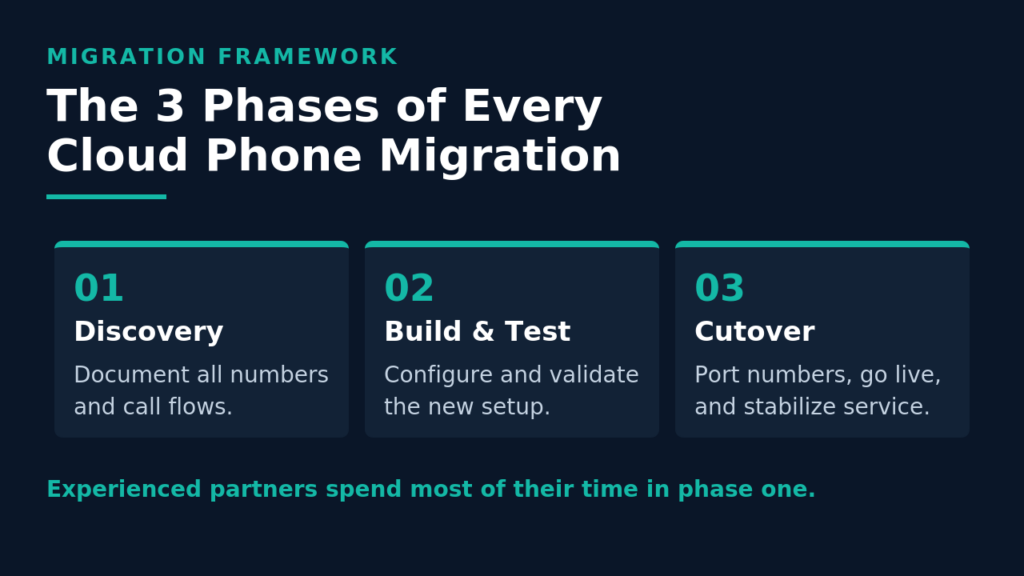
Resellers new to this process spend most of their effort on the build because that’s the visible work. Experienced partners live in discovery, where the surprises hide.
Where PBX Migration Projects Go Wrong
The recurring failures are not exotic. An unaccounted-for extension turns out to run the warehouse paging. A fax line never made it onto the port request. The alarm panel and elevator phone sat on analog lines nobody inventoried. Emergency addresses were copied from the billing record, which lists headquarters rather than the branch where the phone sits. Every one is a discovery failure, and every one is avoidable with a written checklist.
How Do You Run Pre-Migration Discovery?
Discovery has two halves that run in parallel: a full accounting of the existing telephony environment and a readiness assessment of the network that will carry the calls. Start with the number inventory. You want a line-by-line record of every direct inward dial number, main number, fax line, alarm line, elevator line, and extension, mapped to its owner. Reconcile the customer’s recent carrier invoices against what the PBX shows because the two almost never match. Numbers get billed for years after the device was unplugged, and some numbers in daily use never appear on the bill.
Alongside the inventory, capture how calls actually move through the business:
- Call flows, including main-line greetings, auto attendant menus, hunt groups, and after-hours routing
- Voicemail boxes that must be preserved, and whether existing messages need to survive the move
- Integrations touching the phone system today, such as CRM screen pops, door access, or paging

Getting Network Readiness Right Before You Build
Voice quality problems discovered after cutover get blamed on the platform, even when the real cause is a switch overdue for replacement in 2019. Assess the network first and document what you find.
Check bandwidth against projected concurrent call volume with real headroom, and confirm that quality of service policies actually prioritize voice traffic. Test jitter and latency during the customer’s busiest hours rather than at seven in the morning. If they are moving from digital handsets to IP phones, verify the switching gear supports Power over Ethernet on enough ports, since that upgrade carries a lead time nobody wants to discover the week of go-live. This method also opens a clean conversation about managed network services, and most guides to reselling UCaaS and VoIP cover the same groundwork.
7 Best Practices for a Smooth UCaaS Migration
These habits separate partners who confidently run migrations from those who dread them. Make them standard operating procedure, and your UCaaS migration outcomes get far more predictable.
- Assign a single owner on the customer side. One person who can approve call flows and sign the port request. Committees stall migrations.
- Reconcile the invoice against the PBX before quoting. Numbers you didn’t know about become numbers you cannot port on schedule.
- Check the incumbent contract for termination terms. Auto-renewal clauses derail more go-live dates than any technical issue. Find the notice window early.
- Build and fully test before requesting the port. Verify every queue, greeting, and routing rule while the old system still carries live traffic.
- Pilot with a small group first. Ten users, including IT staff and the building’s loudest power users, will surface gaps that no test plan catches.
- Keep the legacy system available as a fallback. Leaving it reachable for two to four weeks after cutover costs little and buys enormous peace of mind.
- Schedule cutover for the lowest-traffic window you can get. Evenings and Friday afternoons are standard for a reason, and they leave the weekend for anything unexpected.
None of these practices requires special tooling. They require discipline and a checklist you follow every time.
How Does Number Porting Work During a Cloud Phone Migration?
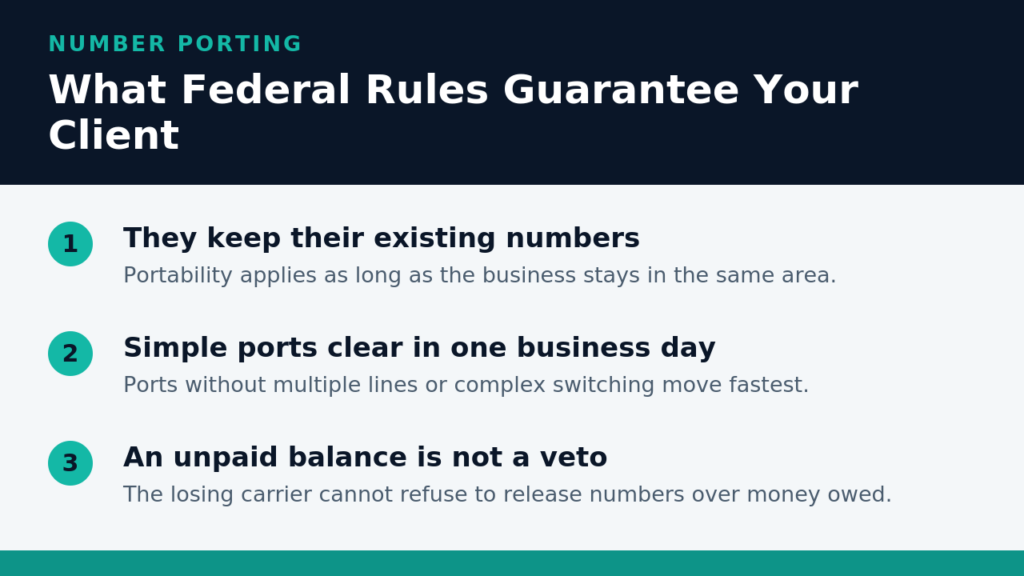
Porting is the step customers worry about most and the one where clear expectations do the most good. Your client has a legal right to keep their numbers, and the rules are public. Under federal local number portability rules, a business can keep its existing phone numbers when switching providers within the same geographic area. Simple ports, meaning those without multiple lines or complex switching adjustments, must be processed within one business day. Once service has been requested from the new provider, the old carrier cannot refuse to release the number over an unpaid balance or termination fee. Tell customers that directly because many assume an outstanding bill gives their incumbent a veto.
What Slows a Port Down
Rejections are almost always administrative. The letter of authorization lists a business name that does not match carrier records. The service address is the billing address rather than the service location. An account number or PIN was transcribed incorrectly. Ask for a recent copy of the actual carrier bill instead of letting someone type details from memory because that single habit eliminates most rejections. Build in a schedule buffer too, since complex ports across many lines routinely take longer than the one-day standard.
Protecting Against Downtime During Cutover
The strongest technique available to you is running a parallel path. Provision the new platform alongside the customer’s existing service rather than in place of it. With both live, you can port numbers in controlled groups without any window where calls have nowhere to land, and calls keep arriving on the legacy path if something needs attention.
This practice also unlocks phased migration, which is what larger customers actually want. You can move one department, floor, or location at a time on a schedule the business chooses instead of forcing one high-risk cutover. For multi-site clients, that flexibility often decides the deal. Owning the timeline yourself rather than queuing behind someone else’s provisioning team is one of the strongest arguments for white-label reselling, and it’s worth weighing carefully when you choose a platform partner.
What Should Your Post-Migration Onboarding Checklist Cover?
Go-live is a milestone, not a finish line. The weeks after cutover decide whether the customer feels good about the decision, and they hold most of the retention value. On day one, verify inbound and outbound calling from every site, test each queue and auto attendant path, confirm voicemail delivery, and validate that emergency calls reach the correct answering point with the correct address. Walk the floor if it’s a single location because physical handsets under real network conditions behave differently from a softphone on your laptop.

Over the first month, focus on adoption:
- Run a short training session for end users and a separate one for whoever administers the system
- Review call reporting after two weeks to catch queues backing up or routing nobody thought through
- Schedule a 30-day check-in to gather feedback and surface features the customer is not using
That last item is where migrations turn into revenue. Customers who just moved to a modern cloud communications platform are unusually receptive to contact center capabilities, business texting, and integrations, since they are already thinking about what the new system can do.
How Do Compliance Requirements Change After Migration?
Emergency calling obligations follow the phone system into the cloud, and they are the compliance area most often overlooked during a cloud phone migration. Two federal rules apply to the multi-line telephone systems most business customers run. Kari’s Law requires that users be able to dial 911 directly without a prefix, such as a leading 9, and that the system notify a central point when a 911 call is placed. RAY BAUM’s Act addresses dispatchable location, meaning the address delivered with the call must include the street address plus details, such as floor or room number, sufficient to identify where the caller is.
In practice, E911 records must be built per device rather than per account, and they must be accurate before go-live. For multi-site customers, address cleanup is a real project rather than a checkbox, so start it during discovery. Compliance also extends to STIR/SHAKEN attestation and 10DLC registration for texting, both easier to handle on a cloud communications platform where those obligations are managed at the infrastructure level.
Frequently Asked Questions
How long does a typical cloud phone migration take? For a single location with straightforward call flows, three to four weeks from kickoff to cutover is realistic. Multi-site or contact center customers typically run 6 to 12 weeks. The variable is rarely the platform configuration. It is discovery, porting timelines, and how fast the customer decides.
Can a customer keep their phone numbers when moving to a hosted PBX? Yes, in nearly all cases. Federal portability rules protect the right to keep existing numbers when switching providers within the same geographic area. Rare exceptions involve relocating to a different region or numbers served by certain rural carriers operating under state waivers.
Should we migrate everyone at once or in phases? Phased migration is lower risk and generally preferred above roughly 50 users or across multiple sites. Smaller single-location customers are usually well served by a single cutover. Run a pilot group first, either way.
What happens to existing desk phones during a hosted PBX migration? It depends on the hardware. Many IP phones can be reprovisioned onto a new platform, which saves the customer real money. Older digital handsets tied to a proprietary PBX cannot be reused. Identify which category the fleet falls into during discovery, since replacement hardware carries both cost and lead time.
Ready to Build Migration Into Your Practice?
The resellers who grow fastest stop treating each migration as a custom project. Build the checklist once, run the same discovery every time, set honest expectations around porting, and follow through for 30 days after cutover. Do that consistently, and cloud phone migration becomes a service you sell rather than a risk you absorb.
The right platform partner makes it repeatable, with self-service provisioning, migration support from people who have done it thousands of times, and a geo-redundant network your customers can rely on from day one. SkySwitch gives MSPs, VARs, and telecom resellers a white-label UCaaS platform built for partners who own the customer relationship, with onboarding that can have committed partners selling in as little as 30 days. Get started with our team to talk through your first migration.

Jessica is a marketing and sales strategist with deep expertise in VoIP telecommunications. As a Marketing Director, she specializes in channel marketing, account management, and product marketing within the communications industry. Jessica is passionate about helping partners grow through compelling messaging and hands-on support.